



Self-Funded Shipping Protection Setup & Economics
Every month, direct-to-consumer merchants lose thousands of dollars dealing with lost, stolen, or damaged carrier parcels.
Historically, merchants had two bad choices:
- Eat the loss entirely: Pay out of pocket to reship packages, eroding net profit margins.
- Install third-party insurance apps (like Route or Seel): These venture-backed apps charge your customers a fee, but keep 85% to 90% of the money, force your customers to submit claim tickets on external portals, and damage your brand reputation.
Supercart introduces a third, mathematically superior model: Self-Funded Shipping Protection.

1. The Self-Insurance “Federal Reserve” Law of E-Commerce
Why is self-funded protection so profitable for merchants? The answer lies in basic wholesale unit economics:
[!IMPORTANT] The Golden Law: Direct-to-consumer merchants replace lost or damaged merchandise at wholesale factory cost (COGS), not retail selling price.
When you collect a $1.98–$3.50 protection fee from 60%+ of your buyers, you build a massive private reserve fund inside your store bank account. Because real-world carrier loss rates typically run between 0.8% and 1.5%, the cost of manufacturing and reshipping replacement units consumes only a tiny fraction of the collected pool.
The Real-World Mathematical Proof
Let us examine the monthly economics for a brand processing 5,000 orders per month with an average order value of $85:
| Metric | Third-Party Broker (Route / Seel) | Supercart In-House Protection |
|---|---|---|
| Monthly Orders | 5,000 | 5,000 |
| Attach Rate (Auto-Select) | 60% (3,000 protected orders) | 65% (3,250 protected orders) |
| Protection Fee per Order | $2.25 | $2.25 |
| Gross Protection Fees Collected | $6,750 | $7,312.50 |
| Fee Kept by 3rd-Party App (85%) | -$5,737.50 | $0.00 (0% Commission) |
| Merchant Share of Fees | $1,012.50 | $7,312.50 |
| Actual Lost Parcels (1.0% loss rate) | 30 parcels | 30 parcels |
| Wholesale Replacement Cost ($22 COGS) | -$0 (Handled by 3rd party via slow portal) | -$660 (Dispatched in 1-click in Shopify Admin) |
| Net Retained Margin to Merchant | $1,012.50 | $6,652.50 / month |
| Annual Bottom-Line Net Profit Lift | $12,150 / year | +$79,830 / year |
By transitioning from a third-party broker to Supercart, this merchant puts an additional +$67,680 per year directly into their bottom line on identical order volume!
2. Step-by-Step Setup in Supercart
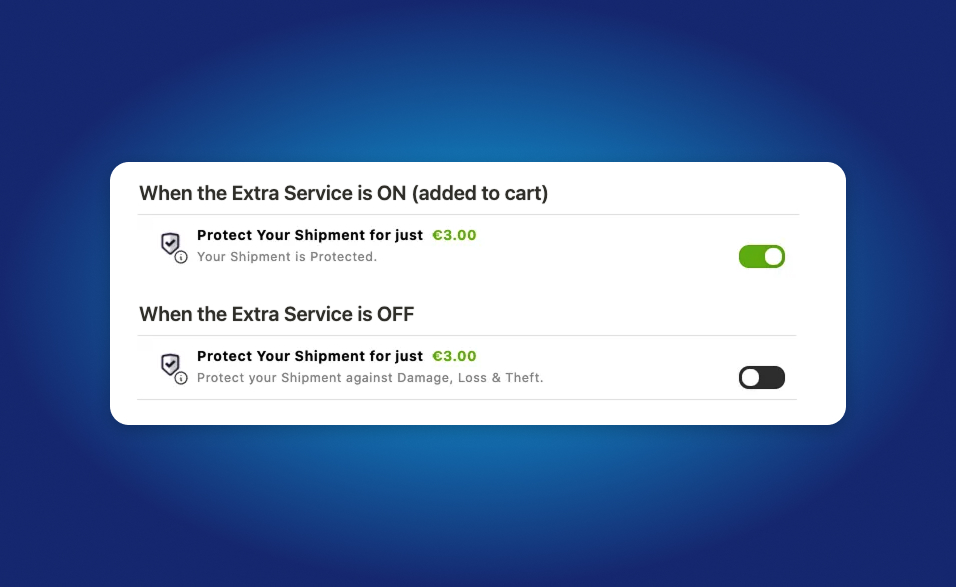
Step 1: Open Shipping Protection in Supercart Dashboard
- Inside the Supercart dashboard, click Extra Services in the navigation.
- Locate Order Protection / Shipping Protection and click Edit.
Step 2: Choose Your Fee Model
You can configure your protection fee as either:
- Fixed Fee: Charge a flat fee for all orders (e.g.
$1.98or$2.49). Best for stores with uniform product pricing. - Dynamic Percentage Fee: Charge a percentage of the cart subtotal (e.g.
1.8%). Best for stores with wide price variances ($20 accessories up to $400 bundles). - Reduced Cents: Enter
0.02to automatically adjust decimal pricing to retail-attractive price points ($2.98, $3.98).
Step 3: Enable Auto-Select & Modern Switch UX
- Auto-Select: Check this box to have protection pre-selected when the customer adds their first item.
- Toggle Switch UX: Select the modern iOS switch layout for optimal mobile engagement.
- Dynamic Subtitle: Set helpful copy:
- Subtitle (When ON): ”✓ Protected against loss, theft, and carrier damage.”
- Subtitle (When OFF): “Opt-out: Merchant not liable for lost or stolen packages.”
Step 4: Configure Auto-Fulfillment
Enable Auto-Fulfillment under account settings. Supercart automatically marks virtual protection line items as fulfilled upon checkout completion so your 3PL warehouse software never experiences partial fulfillment issues.
3. The 2-Minute Native Replacement SOP & Claim Workflow
Supercart deliberately replaces bloated third-party claim portals with a lightning-fast, native Shopify workflow. When a customer contacts your support team reporting parcel loss or transit damage, follow this 4-step SOP:
Step 1: Verify Protection Status in Shopify Admin
- Open the customer order inside Shopify Admin.
- Confirm the line item Shipping Protection or order tag
Supercart-Protectedis present on the order.
Step 2: Create a 1-Click Replacement Order
- Click More Actions → Duplicate Order (or Create order).
- Keep the damaged or lost items; remove any non-physical line items.
- Apply a 100% discount with the internal note:
Shipping Protection Replacement. - Add the order tag:
Protection-Replacement. - Click Mark as paid (or zero out total) and submit to your fulfillment queue / 3PL.
Step 3: Send the VIP Customer Confirmation
Send your customer this high-touch email response (turn a delivery mishap into a lifelong brand advocate):
Subject: Replacement Order Dispatched: [Store Name] Order #[Order Number]
Hi [Customer Name],
Thank you for reaching out, and we are so sorry your carrier ran into delivery issues!
Because your order included our In-House Shipping Protection, you are completely covered. We have already generated a priority replacement order (#[Replacement Order #]) at zero charge to you.
As soon as the carrier scans your new package, you will receive an updated tracking link. Thank you for being a valued customer!
Warm regards,
[Store Name] Customer Care
4. Why Native Claim Handling Beats Third-Party Portals
The “Moral Hazard” Trap of External Portals
When apps like Route, Seel, or Navidium require public “Claims Portals,” they create a massive moral hazard. Automated web portals make submitting claims effortless, anonymous, and frictionless, causing frivolous claims (e.g. 1-day carrier delays or minor box wrinkles) to spike by up to 300% to 500%.
By routing delivery questions through your normal customer service channel (email, live chat, or Gorgias), genuine issues are resolved instantly with human empathy, while opportunistic fraud is stopped in its tracks.
Measuring Monthly Protection Profitability
Merchants often ask: “How do I track how much I made versus what I reshipped?”
In Shopify, the accounting is effortless:
- Total Fees Collected: Go to Analytics → Sales by Product and filter by
Package Protection(or check Supercart real-time dashboard under Services Revenue). - Total Claims Cost: In Shopify Admin, filter orders tagged
Protection-Replacement. Calculate the wholesale manufacturing cost (COGS) of those units. - Net Reserve Profit: $$Net Profit = Gross Protection Fees Collected - Wholesale Replacement COGS$$ Because wholesale replacements cost only a small fraction of collected fees, Shopify merchants consistently retain 75% to 85% of protection fees as pure bottom-line EBITDA.