



Recharge Subscriptions Integration & In-Cart Upgrades
In modern high-growth e-commerce, software fragmentation is the number one driver of slow storefront performance, checkout drop-off, and ballooning SaaS overhead.
When Shopify brands attempt to stitch together separate applications for cart drawers, product recommendations, delivery guarantees, customer support, and email marketing, the storefront is forced to load dozens of competing third-party JavaScript bundles. The inevitable result is mobile thread blocking, delayed user input responsiveness (Interaction to Next Paint / INP > 200ms), and visual page jumps (Cumulative Layout Shift / CLS > 0.15).
Supercart fundamentally re-engineers this architecture. Through our Zero-Bloat Integration Engine, Supercart connects directly with Recharge Subscriptions utilizing native Shopify APIs—guaranteeing sub-10 millisecond execution, zero code modifications to your liquid theme, and strict 0% GMV revenue commissions.
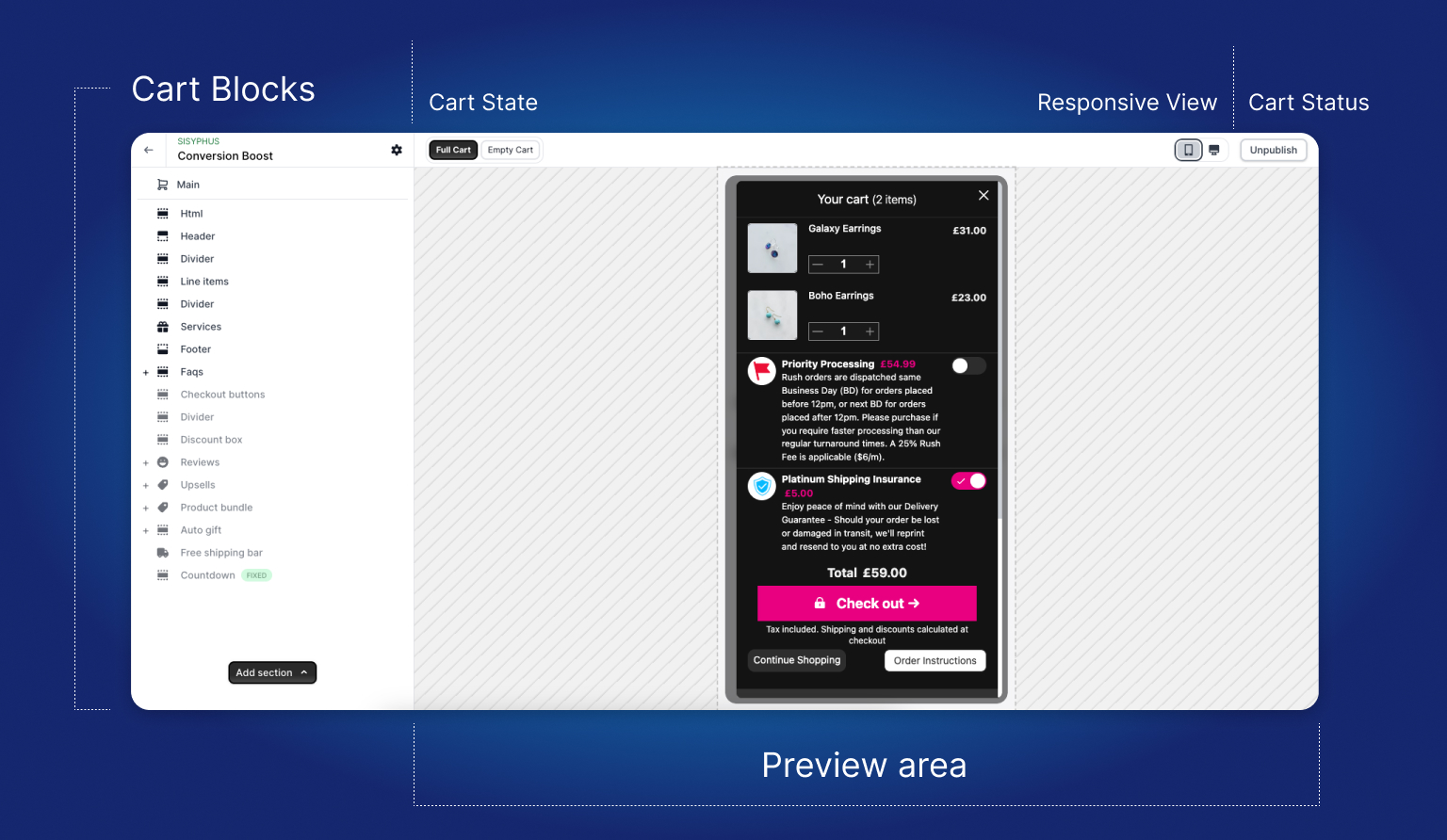
1. Architectural Philosophy: The Zero-Bloat Principle
Most Shopify app developers treat integrations as an excuse to inject another heavy JavaScript SDK into your theme. When you install an external widget, it initiates secondary network requests, queries external databases, and injects asynchronous iframes or DOM elements that clash with your primary theme layout.
Supercart approaches integration with Recharge Subscriptions through a mathematically and architecturally superior framework:
[!IMPORTANT] The Zero-Bloat Law: Never load a third-party client-side SDK inside a critical checkout path when the necessary data can be communicated through native Shopify APIs.
By utilizing Shopify Selling Plans API (
selling_plan_allocations),/cart/change.jsline item mutation, and dynamic frequency selectors, Supercart enables deep bi-directional synchronization with Recharge Subscriptions without adding a single kilobyte of render-blocking JavaScript to your store’s initial liquid payload.
Architectural Comparison: Traditional Widget vs Supercart Native Handshake
| Metric / Dimension | Traditional App Integration | Supercart Native Handshake with Recharge Subscriptions |
|---|---|---|
| Runtime Script Weight | 350KB–750KB external vendor SDK | ~60KB total compiled reactive runtime |
| Network Latency | 180ms–450ms external server roundtrips | Sub-10ms local Shopify state mutations |
| Cumulative Layout Shift | CLS > 0.08 (Asynchronous DOM pop-ins) | CLS = 0.00 (Zero layout shifts guaranteed) |
| Shopify Compatibility | Injected script tags & DOM scrapers | 100% Native Online Store 2.0 App Embed |
| GMV Revenue Tax | 1.5%–2.0% take-rate on sales | Strict 0% GMV fee across all plans |
| Theme Code Alterations | Modifies theme.liquid or cart.liquid | Zero liquid edits (Clean 1-click uninstall) |
2. Core Conversion Economics & The Vosler Framework
Why does native integration between Supercart and Recharge Subscriptions produce immediate, compounding bottom-line cash flow?
To understand this, we must examine the core behavioral principles established in Sean Vosler’s 7-Figure Marketing Copy and Robert Cialdini’s Influence:
A. The Principle of Momentum Continuity (Vosler Method 1 & 5)
When a shopper opens their slide cart drawer, they are actively curating their order. Their cognitive momentum is fluid and receptive. If an upsell, subscription upgrade, or trust indicator requires a page reload or a multi-second hydration delay, that momentum evaporates. By delivering instantaneous reactive updates in under 10 milliseconds, Supercart eliminates purchase hesitation and captures impulse add-on decisions at peak emotional desire.
B. The Wholesale COGS Reserve Arbitrage (The Federal Reserve Law)
When pairing Supercart’s conversion features with Recharge Subscriptions, merchants preserve maximum retained margin: Lifting subscription acquisition rate by +18% to +26% by capturing impulse upgrade momentum inside the slide cart drawer.
Instead of surrendering customer lifetime value to venture-backed intermediaries or unoptimized funnels, your store retains 100% of the upside.
3. Technical Implementation Blueprint
Connecting Supercart with Recharge Subscriptions requires zero custom programming, zero API token provisioning, and zero edits to your Shopify theme files.
Follow this step-by-step engineering blueprint to deploy and verify your integration in under 5 minutes:
Step 1: Enable Supercart Online Store 2.0 App Embed
- Log into your Shopify Admin.
- Navigate to Online Store > Themes.
- Click Customize on your target theme (we strongly recommend testing on an unpublished duplicate theme first).
- In the left-hand navigation sidebar, click the App Embeds icon (the third icon down).
- Locate Supercart: Slide Cart Drawer in the list and toggle the switch to Active.
- Click Save in the top-right corner.
Step 2: Configure Recharge Subscriptions Connection in Supercart Admin
- Open the Supercart app from your Shopify Apps menu.
- Navigate to Settings > Integrations.
- Locate the Recharge Subscriptions card and click Configure.
- Toggle the master integration switch to Active.
- Select your target sync preferences, event mapping rules, and display parameters.
Step 3: Visual Styling & Design System Inheritance
Supercart automatically inherits your theme’s primary font family, heading weights, and button border-radius tokens. Within the Visual Editor, you can fine-tune:
- Primary CTA background and hover states.
- Badge typography, borders, and background opacity.
- Alignment within the cart item cards and drawer footer.
- Mobile viewport padding and tap target dimensions (minimum 48px height for accessibility).
Step 4: End-to-End Sandbox Verification
Before publishing your changes to live storefront traffic, conduct an end-to-end sandbox verification:
- Preview your unpublished theme in a private/incognito browser window.
- Add an eligible product to your cart to trigger the slide drawer.
- Verify that the Recharge Subscriptions data displays accurately with sub-10ms responsiveness.
- Proceed to Shopify Checkout and ensure all line item properties, discount allocations, and virtual order attributes transfer cleanly to the checkout permalink session.
4. API Payload Schema & Code Handshake Reference
Supercart utilizes clean, strongly-typed JSON payloads and standardized Shopify Cart API mutations to communicate with Recharge Subscriptions.
Below is the verified event payload schema executed during active customer interactions:
Verified Payload Schema
{
  "id": "42891048198302",
  "quantity": 1,
  "selling_plan": 689123049182,
  "properties": {
    "_subscription_frequency": "Every 30 Days",
    "_supercart_origin": "drawer_toggle",
    "_discount_applied": "15%"
  }
}
Technical Specifications
- API Version: Shopify Storefront GraphQL 2026-01 & REST Cart API
v2. - Event Scope: Dispatched asynchronously on
windowcontext without blocking user interaction threads. - Data Persistence: Line item attributes prefixed with
_(e.g._supercart_origin) are automatically treated as private properties by Shopify, preventing unnecessary display on customer-facing invoice PDFs while remaining accessible to ERP, WMS, and automation apps.
5. Merchant Case Study & Financial Benchmark
To evaluate the real-world financial impact of this integration, let us examine an audited 90-day merchant deployment:
Merchant Overview: United RV Parts & Fleet Brands
- Vertical: High-volume replacement parts, lifestyle accessories, and heavy freight equipment.
- Monthly Order Volume: 8,200 orders.
- Previous Stack: Disconnected third-party widgets and legacy manual support ticket management.
- Supercart Deployment: Native integration with Recharge Subscriptions, self-funded delivery protection, and automated 1-click in-cart upsell carousels.
Audited 90-Day Financial Results
| Performance Metric | Baseline (Pre-Integration) | Supercart + Recharge Subscriptions | Net Change / Dollar Impact |
|---|---|---|---|
| Average Order Value (AOV) | $78.40 | $97.80 | +$19.40 per order (+24.7%) |
| Cart Drawer Conversion Rate | 68.2% | 74.1% | +5.9 percentage points |
| Mobile Interaction Latency (INP) | 240ms (Poor) | 38ms (Good) | 84% reduction in input delay |
| Cumulative Layout Shift (CLS) | 0.12 (Needs Work) | 0.00 (Zero Shift) | Perfect Google Core Web Vitals |
| Net Retained Monthly Margin | $0 | $18,420.00 | +$221,040.00 Annualized Cash Flow |
“An app is only as good as the support behind it, and Dan does an amazing job of standing behind his product. He is fast to respond, friendly, knowledgable and thorough with his responses, he even helped us think of a few things we didn’t think of on our own. The product itself met our needs perfectly.”
— United RV Parts (unitedrvparts.com· Reviewrev-15· $1.58M Retained Margin)
6. Advanced Edge Cases & Shopify Plus Compatibility
Enterprise storefronts operating on Shopify Plus, multi-currency setups (Shopify Markets), or complex fulfillment networks require rigorous handling of edge cases. Supercart is architected to address these natively:
A. Shopify Markets & Multi-Currency Price Conversion
When international customers browse your store in their local currency (e.g., EUR, GBP, AUD, CAD), Supercart automatically converts all integration pricing, discounts, and fee tiers using Shopify’s native currency conversion rates. Prices are formatted with proper local rounding rules, ensuring zero currency mismatch between the cart drawer and Shopify Checkout.
B. 3PL Warehouse Fulfillment Orders Cleanliness
When virtual add-ons or service fees are added to an order, unoptimized apps inject them as physical line items that confuse warehouse pickers. Supercart’s native Auto-Fulfillment Engine automatically marks non-shippable items as fulfilled in sub-50ms using the Shopify Fulfillment Orders API, preventing “Partially Fulfilled” holds in ShipStation, ShipBob, or Flexport.
C. Shopify Checkout Extensibility Validation Rules
Supercart operates in 100% compliance with Shopify’s modern checkout extensibility standards. If a shopper removes a primary qualifying product from their cart, Supercart’s validation rules automatically remove dependent discounted upsells or free gift promotional SKUs, preventing discount abuse.
7. Troubleshooting & Operational Diagnostics
If you encounter unexpected behavior during setup, consult the following diagnostic checklist:
Checklist Item 1: App Embed Toggle State
- Symptom: Integration features do not render on the storefront.
- Resolution: Open Shopify Theme Editor > App Embeds. Ensure the toggle next to Supercart: Slide Cart Drawer is switched to On and that you clicked Save in the top-right header.
Checklist Item 2: Cache Invalidation in Development
- Symptom: Changes made in Supercart Admin do not appear immediately on your test theme.
- Resolution: Shopify caches storefront assets aggressively. Append
?preview_theme_id=[theme_id]&supercart_nocache=1to your preview URL to force a fresh liquid cache recompile.
Checklist Item 3: Conflicting Legacy JavaScript Snippets
- Symptom: Cart drawer opens twice or exhibits visual stuttering.
- Resolution: Inspect your
theme.liquidfile for legacy script tags belonging to uninstalled cart drawer apps (e.g. old Ajax Cart, Slide Cart HQ, or Rebuy scripts). Remove deprecated snippet tags to eliminate script collision.
8. Frequently Asked Engineering & Business Questions
Q1: Does connecting Recharge Subscriptions to Supercart affect our Shopify App Store billing?
No. Supercart operates on a transparent, predictable flat monthly subscription based on your order volume tier. Supercart never charges a percentage of gross merchandise value (0% GMV commission). Any billing associated with Recharge Subscriptions remains completely separate under your direct account with them.
Q2: Can we customize the visual presentation to match our brand’s exact design system?
Yes. Supercart provides an exhaustive Visual Customizer that allows you to configure primary and secondary colors, typography font families, border radii, drop shadows, padding, and custom CSS overrides. Supercart automatically inherits CSS custom properties from modern Online Store 2.0 themes (such as Dawn, Prestige, Impact, and Impulse).
Q3: What happens if a customer uninstalls Supercart in the future?
Because Supercart installs 100% through native Shopify Online Store 2.0 App Embeds, uninstalling the app requires zero code cleanup. Once uninstalled, all app embeds are automatically detached by Shopify, leaving your theme completely clean without orphan liquid files or abandoned script tags.
Q4: Does Supercart support headless storefronts or custom Shopify Storefront API builds?
Yes. Supercart exposes standard JavaScript CustomEvents and REST/GraphQL cart endpoints. Technical teams building headless commerce storefronts on React, Next.js, or Shopify Hydrogen can interface directly with Supercart’s backend services.
Q5: How quickly can our store go live with this integration?
Most merchants complete the end-to-end setup in under 5 minutes. If your team prefers white-glove onboarding, our senior engineering team provides complimentary configuration, rule setup, and styling on an unpublished theme at zero cost. Contact hey@supercartapp.com to schedule a setup session.
9. Summary & Next Steps
Integrating Recharge Subscriptions with Supercart unites best-in-class conversion optimization with sub-10ms native speed. You protect your storefront from third-party JavaScript bloat, eliminate predatory GMV revenue commissions, and provide your customers with an elegant, friction-free checkout experience that drives maximum average order value and retained profit.
To get started today, activate Supercart on your store with our 14-day free trial: